
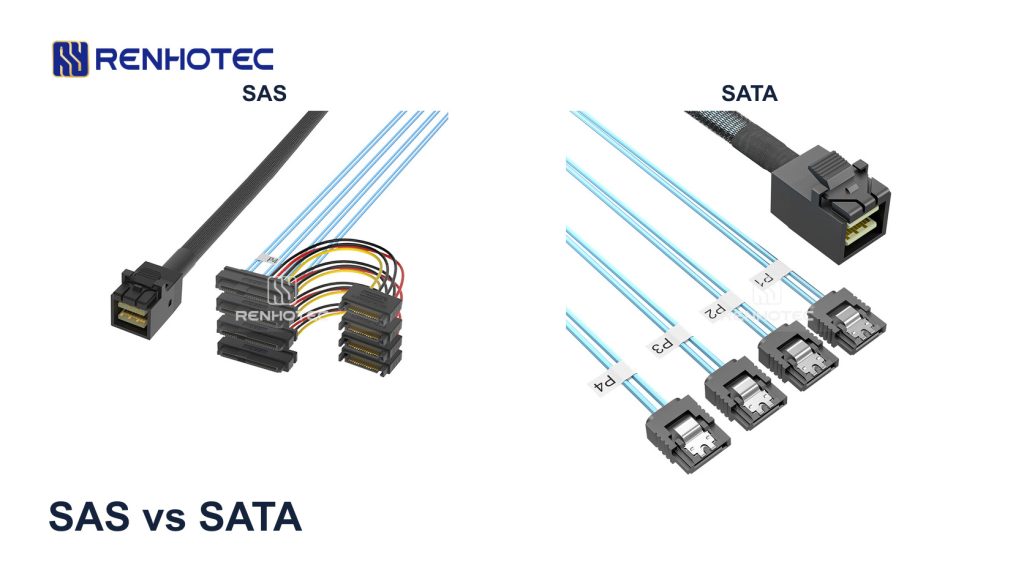
Choose SATA when a supported drive meets the workload on your existing system. Choose SAS when the storage design requires SAS drives or features such as a supported dual-path connection. A higher interface speed alone is not enough to decide. The drive’s storage medium, the controller, the workload and the complete connection path all affect the result.
SAS stands for Serial Attached SCSI; SATA stands for Serial ATA. Both are used for internal storage, including HDDs and SSDs. One compatibility rule matters immediately: a SATA drive can work on a SAS controller that supports it, but a SAS drive cannot work on a SATA-only controller through a passive adapter.
SAS vs SATA: the differences that affect the choice
| Decision | SATA | SAS |
|---|---|---|
| Controller and commands | ATA commands; use a SATA controller or a SAS controller with SATA support. | SCSI commands; requires a SAS-capable controller. |
| Drive paths | Conventional drives have one native port. | Dual-port drives can provide two independent paths in a supported system. |
| Link rate | 6 Gb/s on the SATA models discussed here. | 12 Gb/s on the example HDD; newer SAS controller generations also exist. |
| Performance and service life | Compare the exact HDD or SSD, workload, endurance and operating conditions. The interface name alone cannot establish a winner. | |
| Installed cost | Can use an existing supported SATA connection. | A SATA-only machine also needs a SAS controller and a compatible drive connection; include those parts in the budget. |
SAS and SATA are interfaces, while HDD and SSD describe how the drive stores data. Comparing a SAS HDD with a SATA SSD changes both the interface and the storage medium. Decide whether the job needs bulk capacity, fast random access or redundant access paths before comparing individual drives.
Can SAS and SATA drives use the same controller?
| Controller port | Drive | Connection decision |
|---|---|---|
| SATA-only | SATA | Use the supported SATA connection and a suitable power supply. |
| SATA-only | SAS | Not supported. A passive cable or plug adapter cannot add SAS controller functionality. |
| SAS, with documented SATA support | SATA | Supported in principle. Verify the drive model, cable or backplane, and controller firmware requirements. |
| SAS | SAS | Use a supported SAS drive and a compatible SAS cable or backplane path. |
Seagate’s SAS installation guidance confirms this one-way compatibility. For an existing server, check its supported-drive list as well: protocol compatibility alone does not establish that every drive model is qualified for the system.
If you have a used SAS hard drive and a desktop motherboard with only SATA ports, the missing component is a SAS-capable HBA (host bus adapter) or RAID controller. You will also need an available host slot, supported drivers, the correct drive cable and power. Buying a cable labelled “SAS to SATA” does not supply those functions.
Can SAS and SATA share a RAID array?
Support for both drive interfaces on a controller does not settle the array configuration. The Dell PERC 10 guide, for example, supports qualified SAS and SATA drives but prohibits mixing them within one virtual disk. It also prohibits mixing HDDs and SSDs within that virtual disk. A virtual disk is the logical storage unit the controller presents to the system.
For a replacement in an existing array, use the controller’s replacement-drive rules, including interface, media type, capacity and sector format. A drive can fit the bay and appear in the controller’s inventory yet still be unsuitable for rebuilding that array.
Is SAS faster than SATA?
Link speed is one limit in the complete data path
Separate the interface rate from the drive’s transfer rate. The Broadcom/LSI SAS 9300-8i user guide, version 1.3, lists SAS links up to 12 Gb/s and SATA links up to 6 Gb/s on that adapter. Connecting a 6 Gb/s SATA drive to it does not turn the drive into a 12 Gb/s SAS device.
“12 Gb/s SAS” is not a ceiling for the whole SAS family. Broadcom’s SAS4024 product brief describes a 24G-generation controller and lists 22.5, 12 and 6 Gb/s SAS link rates, with SATA at 6 Gb/s. The controller, drive and intervening components determine which connection is supported; a newer controller does not raise an older drive’s own interface capability.
A matched HDD comparison
Interface link rating
Highest listed rate · gigabits per second
Maximum sustained transfer
Outer diameter · megabytes per second
| Published specification | SATA: ST18000NM000J | SAS: ST18000NM004J |
|---|---|---|
| Capacity | 18 TB | 18 TB |
| Native interface ports | Single | Dual |
| MTBF rating | 2.5 million hours | 2.5 million hours |
| Limited warranty | 5 years | 5 years |
Source: Seagate Exos X18 data sheet DS2045.4, June 2021, page 2. The chart and table use manufacturer ratings. A higher interface rating need not mean a higher sustained transfer rate from the drive.
Match the performance measurement to the workload
- Large file transfers and backups: compare sustained read/write throughput and the slowest shared connection. A faster drive interface will not shorten a transfer already limited by the source disk or network.
- VMs, databases and many small files: compare random IOPS (input/output operations per second) and latency at the intended block size, read/write mix and queue depth. Queue depth is the number of outstanding I/O requests; a result measured with many queued requests does not describe every lightly loaded application.
- Several drives operating together: inspect the controller’s PCIe connection and any shared backplane or expander uplink. The sum of individual drive ratings is not a guaranteed array transfer rate.
Kingston’s SSD guidance explains the mechanical access limits of HDDs and distinguishes IOPS from transfer speed. For a workload dominated by small random accesses, evaluate a suitable SSD before assuming that changing from SATA HDD to SAS HDD will solve the delay. Compare benchmark conditions as well as the reported number.
Is SAS more reliable, and what does dual port add?
The two enterprise HDDs above have the same published MTBF and warranty. That does not prove that all SAS and SATA drives are equally reliable; it shows why “SAS lasts longer” is too broad a buying rule. SATA also includes enterprise-class drives.
Seagate’s explanation of MTBF and AFR describes population statistics. An MTBF rating is not the expected lifetime of the individual drive in your server, and it is not a warranty period.
For HDDs, compare the exact model’s workload rating, operating temperature and vibration limits, plus its intended duty cycle. Seagate’s annualized workload method counts reads and writes together. For example, 500 GB read and 500 GB written each day on a continuously running drive is about 365 TB per year of host workload. Compare that total with the model’s rating. For SSDs, check the specified write-endurance rating, such as TBW (terabytes written), alongside the workload’s write volume.
Dual port protects access to the drive
A dual-port SAS drive can provide a second route to the same data when one supported path becomes unavailable. The Exos X18 SAS manual, section 11.2, describes two independent ports. To use them for failover, the enclosure routing, controllers and host multipath configuration must support the arrangement.
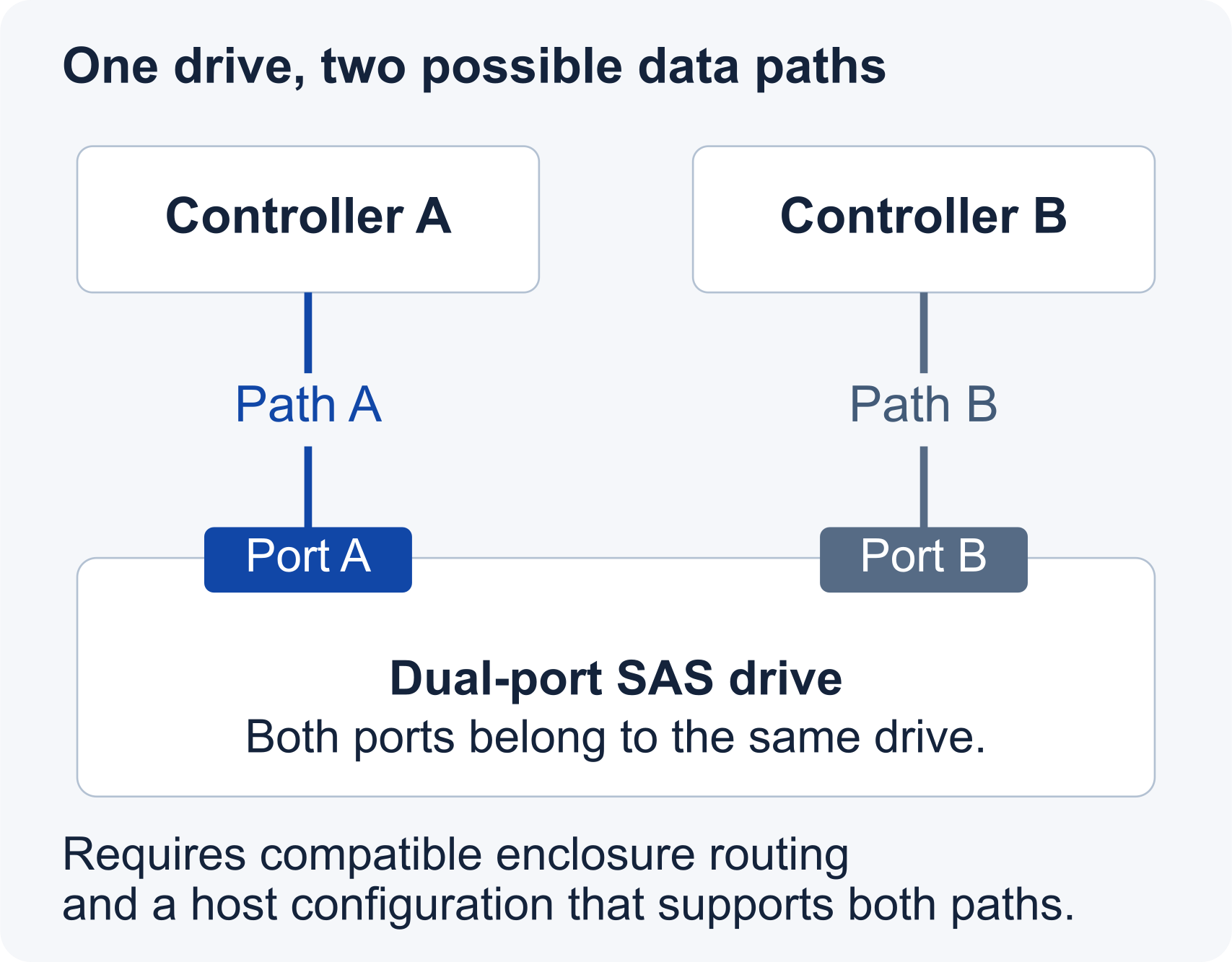
Both paths still reach one physical drive. A failure of that drive affects both, so path redundancy does not replace drive redundancy or backups. Likewise, connecting a dual-port SAS drive through one ordinary breakout cable does not automatically give the system a second path. Buy dual-port capability when the storage design will actually use it.
Which should you choose for your system?
A desktop or workstation with SATA ports
A supported SATA drive is the direct option for those ports. For faster application access, compare suitable SSDs; for additional bulk capacity, compare HDD models and their workload ratings. A low-priced used SAS drive deserves a complete cost check: add the HBA, a usable PCIe slot, cable, power arrangement and any cooling required by the card. Compare that installed total with a drive that uses the connections already available.
A NAS or capacity-focused backup server
If the appliance supports SATA and the chosen drives meet its workload and compatibility requirements, SATA can satisfy this task. Estimate the backup window and restore requirement before paying for a higher link rating. If the destination network is already the bottleneck, upgrading the drive interface alone brings no corresponding end-to-end gain. A fixed NAS drive-compatibility list takes precedence over a general SAS-versus-SATA recommendation.
A storage system designed for two paths
Use qualified dual-port SAS drives when the enclosure and controllers require that architecture. Here the second access path is a specific reason to choose SAS even if a SATA model has similar sequential throughput. Include the second path, supported failover configuration and validation in the system quotation; buying only the drives does not complete the design.
An existing RAID array needing a replacement
Match the supported replacement specification. Keep interface and media type consistent with the array’s rules, and check the required capacity and sector format before ordering. An unsupported replacement can delay the rebuild even when its advertised link rate is higher.
Identify the drive end and the controller end separately
On a conventional SATA drive, the data cable connects to the narrow 7-contact data section; power uses the adjacent 15-contact section. A common SAS drive connection is SFF-8482, with a different mating interface. The SAS interface includes an additional signal port; identify it from the connector layout and model label, not just the overall width. Use the drive’s connector drawing to confirm the mating interface.
The controller end may instead be a multi-lane connector such as Mini-SAS HD SFF-8643. The 9300-8i, for example, has two internal SFF-8643 connectors, each serving four links. A breakout assembly routes those links to individual drives. It does not multiply one SATA channel into four.
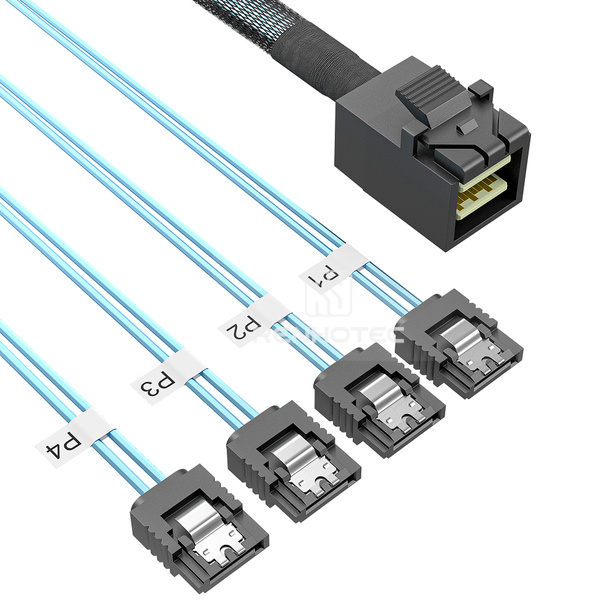
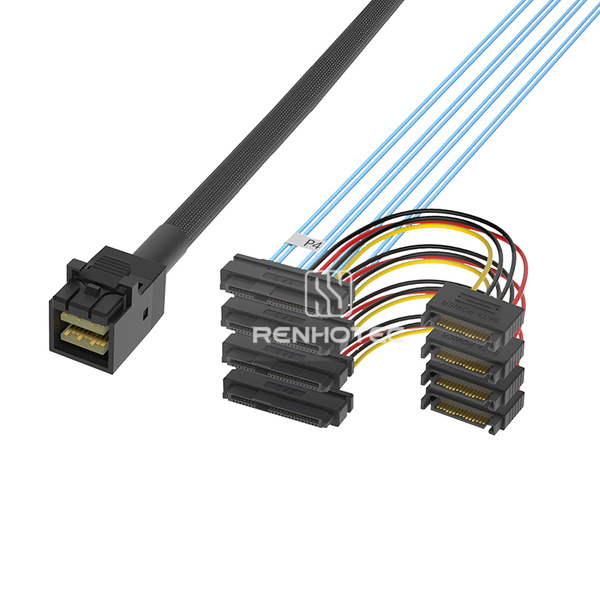
Use the connector layout to identify the cable and its drawing to check pin assignments. SFF-8643 itself is not a protocol guarantee. SNIA SFF-9402, revision 1.1, section 5, describes SAS/SATA and PCIe implementations using this connector family. Read the board manual for the particular socket.
Choose a cable for the actual connection
Locate the host end before choosing a breakout cable. The same connector families can appear in assemblies wired for different endpoint roles.
Forward breakout
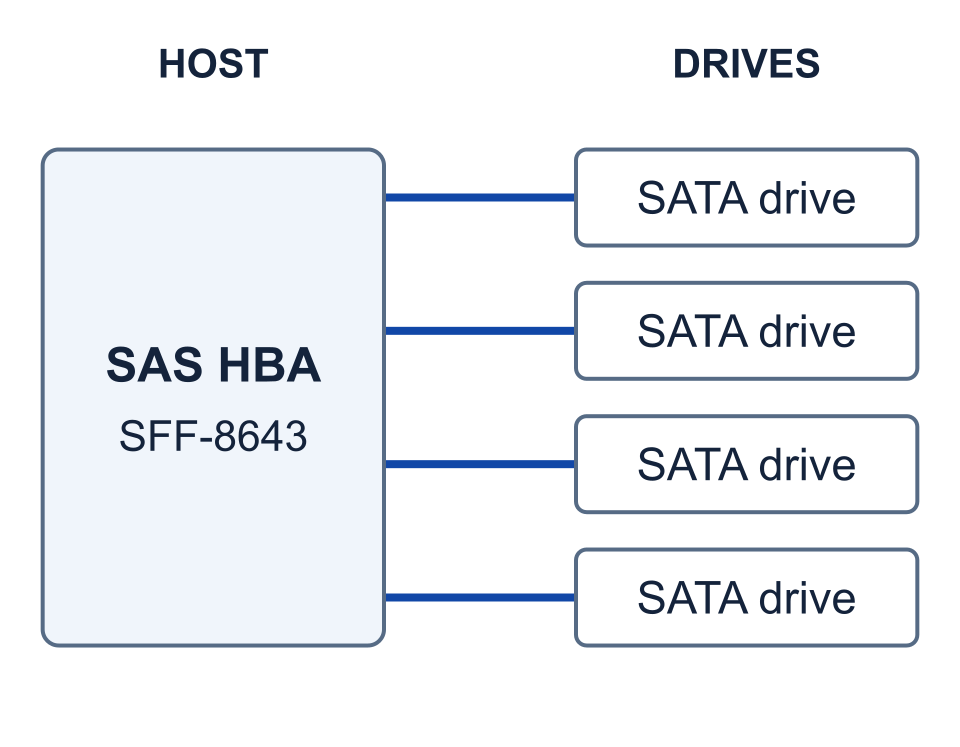
The multi-lane connector is at the host.
Reverse breakout
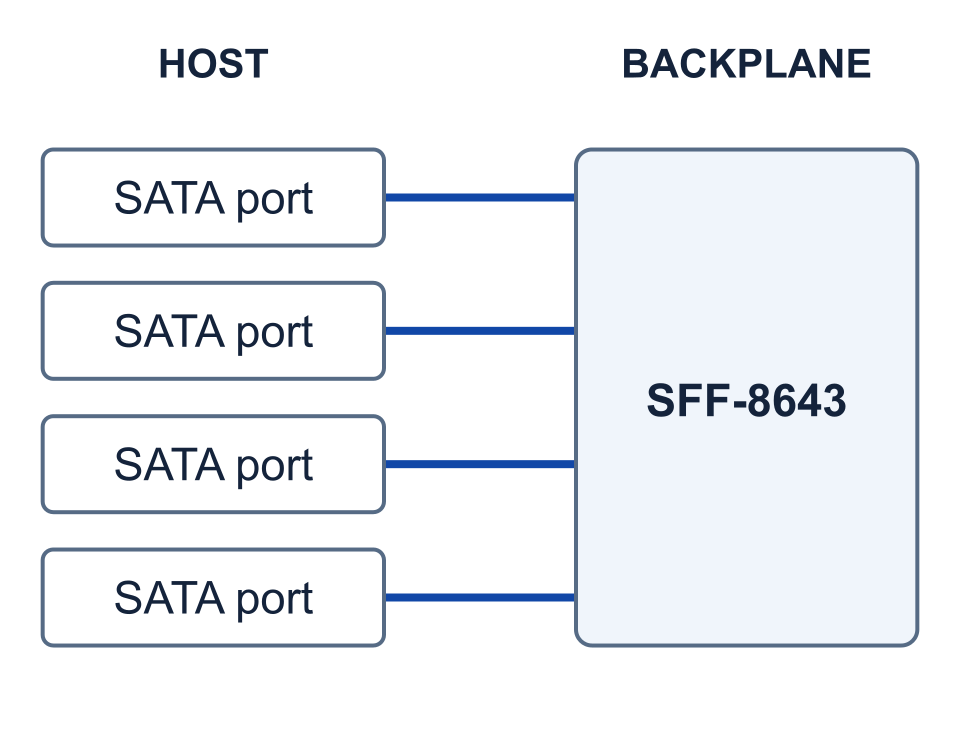
The individual SATA connectors are at the host.
SFF-8643 controller to individual SATA drives
For an SFF-8643 controller port that supports SATA drives, RHT-726-3007 is a forward-breakout candidate for four individual SATA data ports. Its configuration guide covers branch labels, the published length and separate drive power.
SFF-8643 controller to individual SAS drives
For a SAS controller connection to individual SFF-8482 drive interfaces, review RHT-726-3003 with power leads. Compare its drawing with the drive model, power source and required cable route. The presence of a power lead does not establish the supply voltage, available current or system compatibility.
Motherboard SATA ports to a backplane
A connection from separate motherboard SATA ports to a backplane is a different cable task. It can require a reverse breakout, with wiring matched to the backplane. For example, Supermicro’s CBL-SAST-0823 connection guidance places the four SATA connectors at the motherboard and the SFF-8643 connector at the backplane. “Forward” and “reverse” describe these endpoint roles; they do not mean read-only or write-only traffic. Do not reverse a forward-breakout cable simply because its plugs fit. If the chassis has a backplane, record its model and port designation before choosing a cable from the Mini-SAS HD range.
For a cable inquiry, provide the controller and port designation, drive models and quantity, any backplane model, the power connection, and the routed length to the furthest drive. A photograph helps identify connector orientation; the equipment manual or drawing establishes the electrical assignment.
If the drive is not detected, locate the failure first
Check the controller’s own device inventory before troubleshooting an operating-system volume. Seagate’s SAS installation instructions separate controller detection from RAID configuration, drivers and OS setup.
| What you observe | Check next | What it narrows down |
|---|---|---|
| SAS drive on a SATA-only motherboard | The controller’s supported protocols. | A SAS-capable controller is required; another passive adapter cannot fix this. |
| No drives appear on a breakout cable | Host port, forward/reverse wiring, backplane compatibility, connector seating and separate drive power. | A shared connection or configuration issue may affect every branch. |
| Only one branch is missing | Record the drive and branch labels, then isolate drive, power and cable faults using the equipment’s service procedure. | Do not condemn the controller or whole cable solely from one missing drive. |
| Controller sees the drive; OS sees no usable disk | Driver support and the controller’s documented HBA/RAID presentation mode. | The physical path is visible; the next check is how storage is exposed to the OS. |
For a used enterprise drive, also inspect its reported sector format and controller support. A drive identifier appearing in firmware does not prove that the OS or array accepts its current format. Do not initialize a disk, change its sector format or create a new array just to test detection when existing data must be preserved.
Keep the drive model, controller model, firmware version, cable part number and the point where detection stops together in the support request. Those details distinguish a protocol mismatch from a power, cabling or storage-configuration problem.
Additional connector and command reference: Exos X18 SATA product manual, revision D. Cable configurations are based on the linked Renhotec product pages and their R1.0 drawings dated 17 June 2024.